One client shared an SMS verification code, and attackers accessed their Meta account and started trying to spend $1,000 a day advertising overseas websites.
Another clicked a link in an email from a Gmail address and shared a verification code. Attackers accessed their Google Ads account and spent $5,000 sending clicks to scam websites.
And recently, a client forwarded me an email using my name, photograph and Digital Junkies branding.
I hadn’t sent it.
These are real examples from clients I work with. I’m sharing them because the old advice to “watch out for bad spelling and dodgy-looking emails” simply isn’t enough anymore.
AI is helping scammers create convincing messages, research businesses and impersonate people at scale. But one of their most effective tricks is surprisingly simple: persuading you to hand over a security code.
The Exact Email Pretending to Be Me
Notice how closely this email mirrors our real tone, logo, signature photo, and references actual events on Grounded Permaculture’s website. Rupert forwarded it straight to me with: “Dude - this is some sophisticated scamming. Will mark as spam and block.”
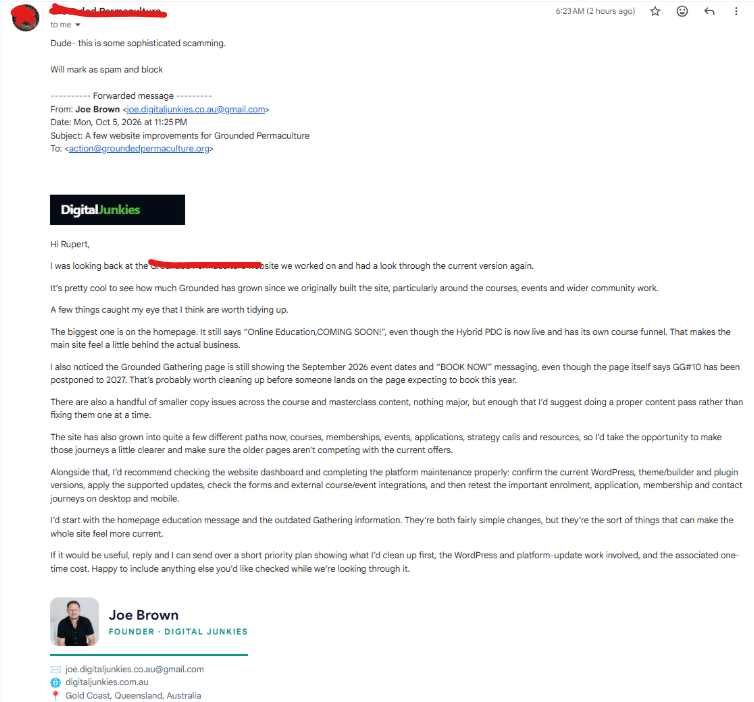
Actual forwarded email sent to Grounded Permaculture on October 5, 2026, using an impersonation Gmail address.
A real verification code can be part of a scam
We’re used to receiving codes when we log into Google, Facebook, our bank or other services. Because the code comes from a genuine provider, the whole interaction can feel legitimate.
That’s the trap.
The code may be genuine. The person asking you for it may not be.
A scammer might claim they need it to verify your business, fix an account issue or prevent a suspension. In reality, they may be trying to complete a login or account recovery themselves.
A common attack sequence looks like this:
- 1Someone sends a convincing message or directs you to a fake login page.
- 2They obtain your login details or start an account recovery process.
- 3The genuine service sends you a security code.
- 4They persuade you to share it or enter it on their fake page.
- 5They use it to complete the process and gain access.
Not every attack works this way, but it explains why a code that expires in a few minutes can still do serious damage.
Google explicitly warns users never to share verification codes because scammers may use them to take over accounts.
The same caution applies to “Approve sign-in” notifications. If you didn’t initiate the login, don’t approve it.
Two recent client examples — and what they teach us
$1,000/day Rogue Ads Campaign
A client emailed an SMS verification code. Attackers then gained access and started trying to run advertising at $1,000 a day to overseas websites.
$5,000 Spent on Scam Traffic
A client clicked a link from a Gmail sender and shared a code. Attackers accessed the account and spent $5,000 on clicks to scam sites.
These incidents also show why two-factor authentication needs to be used carefully. It adds protection, but a code can lose its protective value when you hand it to the person trying to get in.
This isn’t about blaming the clients. Scams are designed to catch busy people during an ordinary working day.
The email pretending to be me was unusually convincing
It used my name, my photo, the Digital Junkies logo and a professional signature. It discussed specific details on the client’s website and referred to our supposed working relationship.
It didn’t immediately demand money. It offered to send a plan and quote for website improvements.
That made it a believable conversation starter.
joe.digitaljunkies.co.au@gmail.com
The domain after the @ symbol was gmail.com. The words “digitaljunkies” before it did not make it a Digital Junkies business address.
Gmail itself isn’t a warning sign in every situation — plenty of legitimate businesses use it. The issue here was someone using an unrelated address to impersonate me.
Nor does a familiar address guarantee safety. Criminals can spoof sender information or use a genuinely compromised account. That’s why unusual requests need an independent check.
I can’t confirm AI was used in these particular incidents. But the impersonation email shows the kind of personalised approach that AI can make easier to produce.
How big is the problem?
Recent figures give some perspective:
Reported by Australians in scam losses in 2025, up 7.8% compared with 2024.
In reported losses specifically attributed to phishing across contributing organisations.
Phishing reports received by Scamwatch in 2025, making phishing its most reported category.
Phishing and investment scam websites coordinated for removal by ASIC in 2025 (a 90% increase).
There is also evidence that AI can make phishing more persuasive. Microsoft’s reporting on its 2025 Digital Defense Report cites AI-automated phishing achieving 54% click-through rates compared with 12% for traditional phishing — a 4.5-fold difference in the comparison it reports.
That is a click-rate comparison, not a claim that 54% of people lose money or that every AI scam performs that way. The Australian loss figures cover scams generally; they don’t tell us what proportion involved AI.
What scammers are doing with AI now
AI makes it easier to produce messages that feel researched and relevant.
Scammers can use publicly available information to reference your business, location, services or recent activities. They can generate large numbers of personalised messages instead of sending everyone the same generic email.
They can also create fake websites and documents, clone voices, generate convincing videos and adapt their responses when someone questions their story. Scamwatch warns about all these uses.
For a business owner, that changes what “suspicious” looks like.
A message might have good grammar, your supplier’s branding and details about a project. A fake support conversation might sound calm and helpful. A voice might sound familiar.
Eight rules I want every client and team member to follow
Keep login and recovery codes to yourself.
Don’t forward screenshots of codes or share them with someone claiming to be support, your agency or a colleague. Use proper account invitations and permissions when someone needs access.
Check the full sender address.
Expand the sender details. Look beyond the display name and inspect the domain after the @. Compare it with previously verified correspondence, but remember that genuine accounts can also be compromised.
Open the account yourself.
If an email says your advertising account, payment method or business page needs attention, open the official app or your saved bookmark. Check there before following instructions.
Verify through a separate, trusted channel.
Call the person on a number you already know. Don’t use a new number supplied in the suspicious message. Replying “Is this really you?” to the same sender doesn’t establish anything.
Treat urgency as a reason to slow down.
“Your page will be deleted”, “your account is suspended” or “send the code now” should prompt a check, not an immediate response. A helpful, unhurried message can also be fraudulent.
Check access requests as carefully as payments.
Adding an administrator, accepting a business partner or connecting an unfamiliar app can grant significant access. Confirm who needs access and why before approving.
Use stronger sign-in protection.
Keep multi-factor authentication enabled. Where supported, use passkeys or FIDO2 security keys, which resist phishing. Authenticator codes can also be stolen through phishing, so keep those private too.
Watch your advertising accounts and billing.
Check for unfamiliar campaigns, destinations, budget increases and new users. Enable relevant alerts and remove access people no longer need. Google’s compromised-account guidance specifically highlights unauthorised users, linked manager accounts and budget changes.
Shared a code or noticed unauthorised spending? Act immediately
Don’t wait to see whether anything happens.
- Contact your agency or IT support through a trusted channel. Explain exactly what you clicked, entered, shared or approved.
- Open the genuine platform directly. If you still have access, pause unauthorised advertising and begin securing the account.
- Use a trusted device to change compromised passwords and sign out of existing sessions. If you suspect malware, get help cleaning the affected device before using it for new passwords.
- Review users, linked accounts, connected apps and recovery details. A password change alone may not remove every route an attacker has added.
- Report the compromise to the platform and contact your bank about unauthorised charges.
- Keep evidence. Save messages, screenshots, campaign IDs, charges and the times changes occurred.
Google advises reporting a compromised Ads account promptly and collecting evidence from its change history. Reimbursement may be available following investigation, but it isn’t automatic or guaranteed.
A personal message from me
If you receive an unexpected message that appears to come from me or Digital Junkies, please check before sending money, sharing information or granting access.
Call me on the number you already have, or contact us through our official website.
A copied photo, familiar logo or convincing signature isn’t enough. Neither is someone knowing details about your business.
I’d much rather take a quick call than see you lose money to someone pretending to be me.
And if you remember only one thing: a verification code is a key to your account. Keep it to yourself.
Joe Brown
Founder, Digital Junkies
Unsure About An Email You Received?
Call our official Gold Coast office directly or reach out through our secure contact form. We’ll verify whether the message came from our team.